Chapter 1. Introduction to JavaScript
JavaScript is the programming language of the web. The overwhelming majority of websites use JavaScript, and all modern web browsers—on desktops, tablets, and phones—include JavaScript interpreters, making JavaScript the most-deployed programming language in history. Over the last decade, Node.js has enabled JavaScript programming outside of web browsers, and the dramatic success of Node means that JavaScript is now also the most-used programming language among software developers. Whether you’re starting from scratch or are already using JavaScript professionally, this book will help you master the language.
If you are already familiar with other programming languages, it may help you to know that JavaScript is a high-level, dynamic, interpreted programming language that is well-suited to object-oriented and functional programming styles. JavaScript’s variables are untyped. Its syntax is loosely based on Java, but the languages are otherwise unrelated. JavaScript derives its first-class functions from Scheme and its prototype-based inheritance from the little-known language Self. But you do not need to know any of those languages, or be familiar with those terms, to use this book and learn JavaScript.
The name “JavaScript” is quite misleading. Except for a superficial syntactic resemblance, JavaScript is completely different from the Java programming language. And JavaScript has long since outgrown its scripting-language roots to become a robust and efficient general-purpose language suitable for serious software engineering and projects with huge codebases.
To be useful, every language must have a platform, or standard library, for performing things like basic input and output. The core JavaScript language defines a minimal API for working with numbers, text, arrays, sets, maps, and so on, but does not include any input or output functionality. Input and output (as well as more sophisticated features, such as networking, storage, and graphics) are the responsibility of the “host environment” within which JavaScript is embedded.
The original host environment for JavaScript was a web browser, and this is still the most common execution environment for JavaScript code. The web browser environment allows JavaScript code to obtain input from the user’s mouse and keyboard and by making HTTP requests. And it allows JavaScript code to display output to the user with HTML and CSS.
Since 2010, another host environment has been available for JavaScript code. Instead of constraining JavaScript to work with the APIs provided by a web browser, Node gives JavaScript access to the entire operating system, allowing JavaScript programs to read and write files, send and receive data over the network, and make and serve HTTP requests. Node is a popular choice for implementing web servers and also a convenient tool for writing simple utility scripts as an alternative to shell scripts.
Most of this book is focused on the JavaScript language itself. Chapter 11 documents the JavaScript standard library, Chapter 15 introduces the web browser host environment, and Chapter 16 introduces the Node host environment.
This book covers low-level fundamentals first, and then builds on those to more advanced and higher-level abstractions. The chapters are intended to be read more or less in order. But learning a new programming language is never a linear process, and describing a language is not linear either: each language feature is related to other features, and this book is full of cross-references—sometimes backward and sometimes forward—to related material. This introductory chapter makes a quick first pass through the language, introducing key features that will make it easier to understand the in-depth treatment in the chapters that follow. If you are already a practicing JavaScript programmer, you can probably skip this chapter. (Although you might enjoy reading Example 1-1 at the end of the chapter before you move on.)
1.1 Exploring JavaScript
When learning a new programming language, it’s important to try the examples in the book, then modify them and try them again to test your understanding of the language. To do that, you need a JavaScript interpreter.
The easiest way to try out a few lines of JavaScript is to open up the web developer tools in your web browser (with F12, Ctrl-Shift-I, or Command-Option-I) and select the Console tab. You can then type code at the prompt and see the results as you type. Browser developer tools often appear as panes at the bottom or right of the browser window, but you can usually detach them as separate windows (as pictured in Figure 1-1), which is often quite convenient.

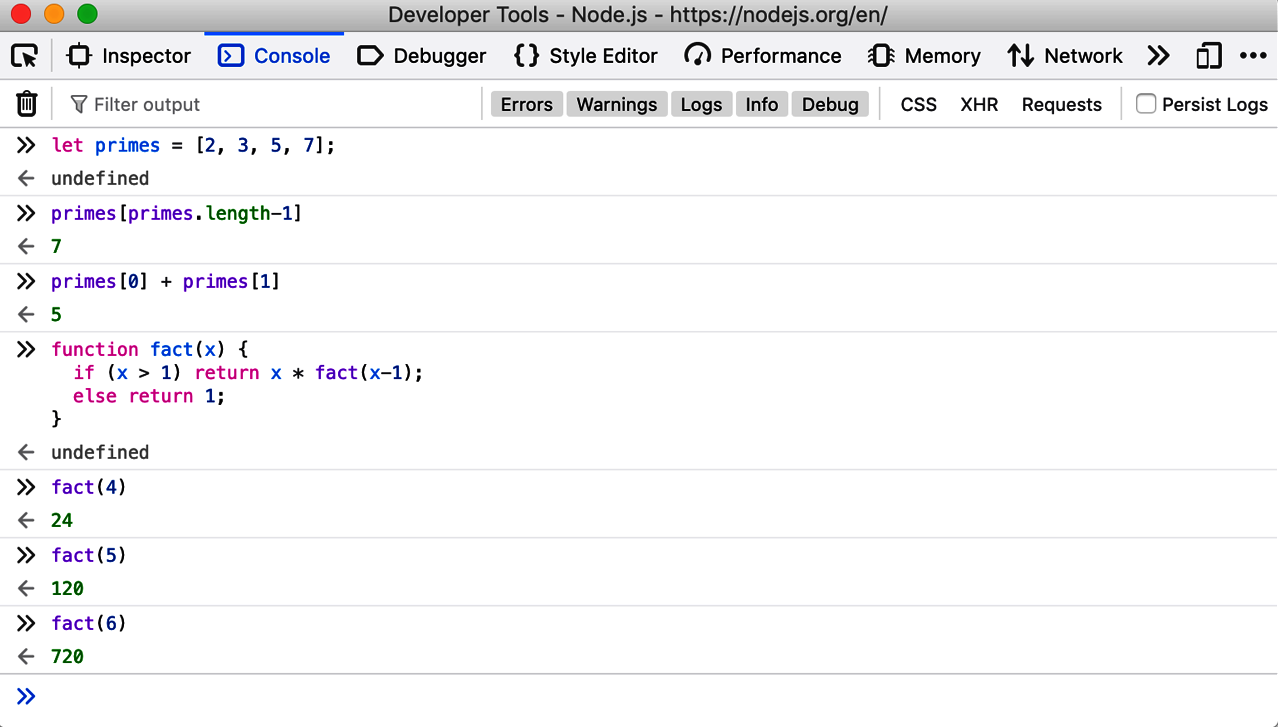
Figure 1-1. The JavaScript console in Firefox’s Developer Tools
Another way to try out JavaScript code is to download and install Node from https://nodejs.org. Once Node is installed on your system, you can simply open a Terminal window and type node to begin an interactive JavaScript session like this one:
1.2 Hello World
When you are ready to start experimenting with longer chunks of code, these line-by-line interactive environments may no longer be suitable, and you will probably prefer to write your code in a text editor. From there, you can copy and paste to the JavaScript console or into a Node session. Or you can save your code to a file (the traditional filename extension for JavaScript code is .js) and then run that file of JavaScript code with Node:
If you use Node in a noninteractive manner like this, it won’t automatically print out the value of all the code you run, so you’ll have to do that yourself. You can use the function console.log() to display text and other JavaScript values in your terminal window or in a browser’s developer tools console. So, for example, if you create a hello.js file containing this line of code:
and execute the file with node hello.js, you’ll see the message “Hello World!” printed out.
If you want to see that same message printed out in the JavaScript console of a web browser, create a new file named hello.html, and put this text in it:
Then load hello.html into your web browser using a file:// URL like this one:
Open the developer tools window to see the greeting in the console.
1.3 A Tour of JavaScript
This section presents a quick introduction, through code examples, to the JavaScript language. After this introductory chapter, we dive into JavaScript at the lowest level: Chapter 2 explains things like JavaScript comments, semicolons, and the Unicode character set. Chapter 3 starts to get more interesting: it explains JavaScript variables and the values you can assign to those variables.
Here’s some sample code to illustrate the highlights of those two chapters:
Two other very important types that JavaScript programs can manipulate are objects and arrays. These are the subjects of Chapters 6 and 7, but they are so important that you’ll see them many times before you reach those chapters:
The syntax illustrated here for listing array elements within square braces or mapping object property names to property values inside curly braces is known as an initializer expression, and it is just one of the topics of Chapter 4. An expression is a phrase of JavaScript that can be evaluated to produce a value. For example, the use of . and [] to refer to the value of an object property or array element is an expression.
One of the most common ways to form expressions in JavaScript is to use operators:
If JavaScript expressions are like phrases, then JavaScript statements are like full sentences. Statements are the topic of Chapter 5. Roughly, an expression is something that computes a value but doesn’t do anything: it doesn’t alter the program state in any way. Statements, on the other hand, don’t have a value, but they do alter the state. You’ve seen variable declarations and assignment statements above. The other broad category of statement is control structures, such as conditionals and loops. You’ll see examples below, after we cover functions.
A function is a named and parameterized block of JavaScript code that you define once, and can then invoke over and over again. Functions aren’t covered formally until Chapter 8, but like objects and arrays, you’ll see them many times before you get to that chapter. Here are some simple examples:
In ES6 and later, there is a shorthand syntax for defining functions. This concise syntax uses => to separate the argument list from the function body, so functions defined this way are known as arrow functions. Arrow functions are most commonly used when you want to pass an unnamed function as an argument to another function. The preceding code looks like this when rewritten to use arrow functions:
When we use functions with objects, we get methods:
Now, as promised, here are some functions whose bodies demonstrate common JavaScript control structure statements:
JavaScript supports an object-oriented programming style, but it is significantly different than “classical” object-oriented programming languages. Chapter 9 covers object-oriented programming in JavaScript in detail, with lots of examples. Here is a very simple example that demonstrates how to define a JavaScript class to represent 2D geometric points. Objects that are instances of this class have a single method, named distance(), that computes the distance of the point from the origin:
This introductory tour of JavaScript’s fundamental syntax and capabilities ends here, but the book continues with self-contained chapters that cover additional features of the language:
- Chapter 10, Modules
Shows how JavaScript code in one file or script can use JavaScript functions and classes defined in other files or scripts.
- Chapter 11, The JavaScript Standard Library
Covers the built-in functions and classes that are available to all JavaScript programs. This includes important data stuctures like maps and sets, a regular expression class for textual pattern matching, functions for serializing JavaScript data structures, and much more.
- Chapter 12, Iterators and Generators
Explains how the
for/ofloop works and how you can make your own classes iterable withfor/of. It also covers generator functions and theyieldstatement.- Chapter 13, Asynchronous JavaScript
This chapter is an in-depth exploration of asynchronous programming in JavaScript, covering callbacks and events, Promise-based APIs, and the
asyncandawaitkeywords. Although the core JavaScript language is not asynchronous, asynchronous APIs are the default in both web browsers and Node, and this chapter explains the techniques for working with those APIs.- Chapter 14, Metaprogramming
Introduces a number of advanced features of JavaScript that may be of interest to programmers writing libraries of code for other JavaScript programmers to use.
- Chapter 15, JavaScript in Web Browsers
Introduces the web browser host environment, explains how web browsers execute JavaScript code, and covers the most important of the many APIs defined by web browsers. This is by far the longest chapter in the book.
- Chapter 16, Server-Side JavaScript with Node
Introduces the Node host environment, covering the fundamental programming model and the data structures and APIs that are most important to understand.
- Chapter 17, JavaScript Tools and Extensions
Covers tools and language extensions that are worth knowing about because they are widely used and may make you a more productive programmer.
1.4 Example: Character Frequency Histograms
This chapter concludes with a short but nontrivial JavaScript program. Example 1-1 is a Node program that reads text from standard input, computes a character frequency histogram from that text, and then prints out the histogram. You could invoke the program like this to analyze the character frequency of its own source code:
This example uses a number of advanced JavaScript features and is intended to demonstrate what real-world JavaScript programs can look like. You should not expect to understand all of the code yet, but be assured that all of it will be explained in the chapters that follow.
Example 1-1. Computing character frequency histograms with JavaScript
1.5 Summary
This book explains JavaScript from the bottom up. This means that we start with low-level details like comments, identifiers, variables, and types; then build to expressions, statements, objects, and functions; and then cover high-level language abstractions like classes and modules. I take the word definitive in the title of this book seriously, and the coming chapters explain the language at a level of detail that may feel off-putting at first. True mastery of JavaScript requires an understanding of the details, however, and I hope that you will make time to read this book cover to cover. But please don’t feel that you need to do that on your first reading. If you find yourself feeling bogged down in a section, simply skip to the next. You can come back and master the details once you have a working knowledge of the language as a whole.
Comments
Post a Comment